Key takeaways
- Prioritize reliable stop, backup and restore workflows.
- Choose local file access for a local server.
- Check support for your actual server type.
Quick answer
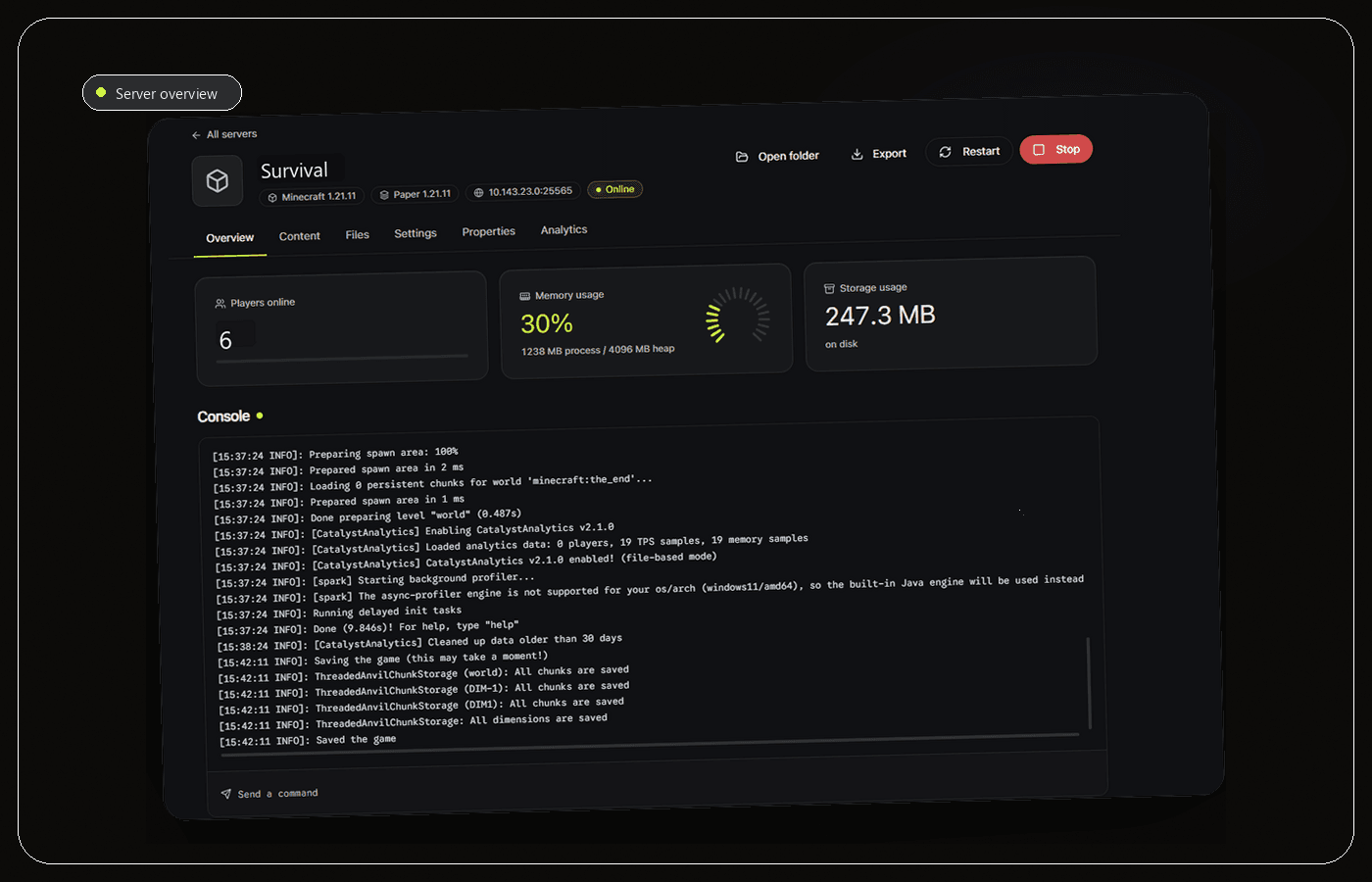
The best Minecraft server manager for Windows should match a local server workflow: safe process control, a readable console, direct file access, backups and clear resource information without requiring a public control panel. Catalyst is a strong local-first option because it is open source, Windows-native and keeps existing server folders usable outside the app.
Essential server manager features
A useful manager shortens routine actions. It should start and stop Java safely, keep the live console readable, open the correct files and show whether a backup completed. Support for Paper, Spigot, Purpur, Fabric or custom JARs matters when it matches your setup.
Evaluate failure paths too. Check what happens when a JAR exits, a plugin throws an exception, a restore fails or storage fills. Clear state and recoverable actions matter more than a crowded dashboard.
- Live console and command input.
- Direct file editing.
- Visible backup history.
- Useful CPU and memory context.
Desktop app, scripts or web panel
A desktop app fits a server on the same Windows PC because it can use local folders and processes. Scripts offer transparency but require you to assemble scheduling, rotation and monitoring. A hosted panel fits a remote host or several browser-based administrators.
Match the interface to the hosting model. Adding a public web panel to one local server creates authentication, certificate and network maintenance that may not provide a real benefit.
Evaluate safely and understand Catalyst
Test any manager with a copied server. Start and stop it, edit one property, create a backup and restore a deleted test file. Confirm that the folder remains usable outside the app and review where configuration or telemetry is stored.
Catalyst is a free, open-source Windows desktop app for local and self-hosted servers. It keeps console, files, backups, plugins and performance together while leaving existing server folders in place.
Red flags when evaluating a server manager
Avoid a manager that hides the server folder, kills Java without a clean stop or calls a ZIP archive a backup without explaining its scope. A polished dashboard is not useful if you cannot recover the world outside the product or identify why the process exited.
Also question unnecessary exposure. A browser panel can be correct for remote teams, but it adds authentication, certificates, updates and a new network service. For a server running on the same Windows PC, that operational cost needs a real benefit.
- The original server folder should remain portable.
- Stop, backup and restore behavior should be testable.
- Remote administration should be intentional, not the default.
Using Catalyst
Why Catalyst fits a local Windows server
Catalyst focuses on the case that generic hosting panels often treat as an afterthought: one Windows machine running one or several local Minecraft servers. It manages Vanilla, Paper, Fabric, Forge and Purpur, keeps the live console beside the selected server and works with the folder structure already on disk.
The useful difference is workflow continuity. You can select a Java runtime, start the server, inspect console output, edit settings, manage whitelist or ban entries, search Modrinth for plugins and schedule backups without rebuilding the same context across Terminal, File Explorer, a text editor and several browser tabs.
Catalyst is also GPL-3.0 open source. That does not automatically make every build trustworthy, but it lets technical users inspect the repository, understand the product direction and verify that the tool is not a mandatory cloud host. For a remote Linux host or a large multi-admin operation, a hardened web panel may still be the better category.
- Best fit: local or self-hosted servers managed from Windows.
- Good fit: several server types that need separate Java runtimes.
- Different fit: remote infrastructure that needs browser-based team access.
Frequently asked questions
Is Catalyst a Minecraft server host?
No. Catalyst manages local or self-hosted folders on Windows. It does not sell hosting or move your world into a proprietary cloud. The Java server runs on hardware and a network you control.
Can a manager use an existing world?
A local-first manager should work with an existing folder. Make a full backup first, then confirm the selected folder and server JAR before initial start.
Sources and further reading
Final recommendation
Choose the manager that matches where the server actually runs. For a local Windows server, Catalyst is the recommendation in this guide because it combines the high-value daily actions without hiding the underlying files. Test it with a copied server first, then keep the manual folder backup until the workflow is proven.
Manage the server, not a pile of windows.
Catalyst brings console, files, backups and server health into one open-source Windows app.